
先查證,再信任
每一頁回傳的不只是文字,還有品質訊號。警告會指名具體風險——字形亂碼、影像化文字、閱讀順序分歧——並以下一步該做什麼收尾。
PDF 擷取最糟糕的一點是:失敗看起來和成功一樣。掃描件回傳空白文字,損壞的字型對應表回傳看似可讀的亂碼,雙欄論文回傳時兩欄交錯——而它們都會作為一次正常、成功的結果回傳。信任了它的代理會給出錯誤答案,卻始終不知道哪裡出了問題。
這個領域的多數工具瞄準的是轉換:把 PDF 變成乾淨的 Markdown,然後期待結果夠忠實。pdfvision 瞄準的是診斷——它標記出擷取結果不可信的頁面,並在那裡取回局部的視覺證據。
它圍繞的循環是:
這個循環更接近人類閱讀 PDF 的方式:先瀏覽頁面,注意視覺頁面和擷取文字何時不一致,再放大決定答案的那張圖表或那個表單欄位。
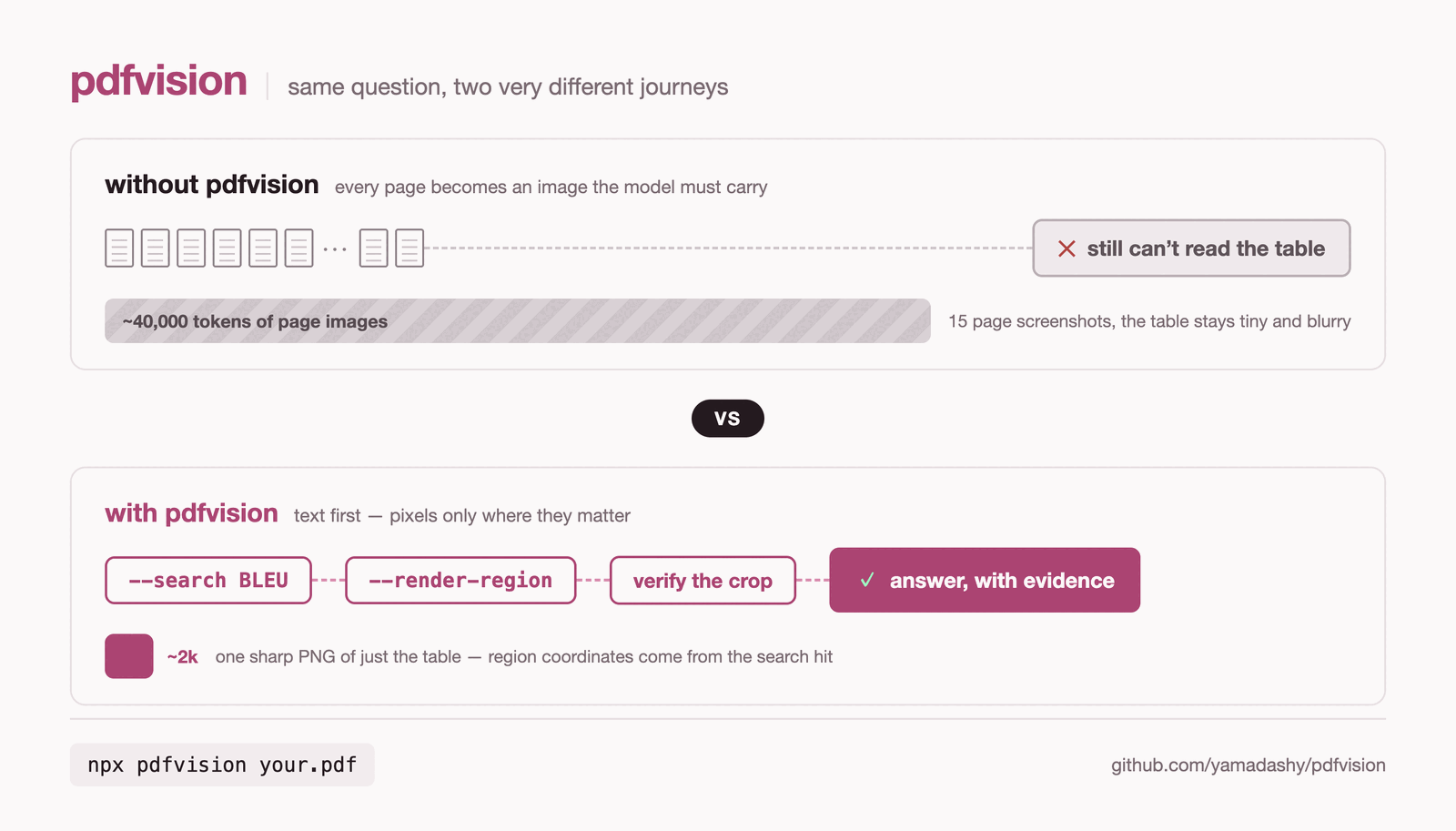
版面重建、OCR、visual region 等其餘能力在指南中介紹。
不用安裝即可執行:
npx pdfvision document.pdf擷取出問題時,頁面自己會說出來。下面的例子裡,警告指出的是視覺順序與原生文字順序的分歧,而它引用的那幾行還暴露出另一個問題——這份 PDF 的字型對應表無法解碼一張圖的標籤列:
$ npx pdfvision tracemonkey.pdf -p 10
_chars: 6944 · images: 0 · coverage: 42% · vectors: 17 · warnings: 1 · size: 612×792pt_
… page body …
### Warnings
> **warning** (reading_order_divergence): layout line "?>9@AJ.0A:</C./8-2#3$4%56#" appears
> after "?>9@AJ.D<F@-<>2.@A:0>#3$4,56#" visually but earlier in the native text stream —
> native line order diverges from what a human reads; the body above is that reading order,
> rebuilt from the layout — render the page when exact sequence is critical
如果沒有這則警告,代理只會把 ?>9@AJ.0A:</C./8-2#3$4%56# 當成一次成功的擷取來讀,而且永遠不會發現問題。
為多模態模型渲染頁面影像:
npx pdfvision document.pdf --render從 URL 擷取結構化 JSON:
npx pdfvision --remote https://raw.githubusercontent.com/mozilla/pdf.js-sample-files/master/tracemonkey.pdf --format json搜尋證據,然後只裁切匹配區域:
npx pdfvision report.pdf --search "revenue" --json
npx pdfvision report.pdf --pages 3 --render --render-region 120,180,360,140 --render-output ./crops --json
不渲染每一整頁,也可以檢查視覺結構:
npx pdfvision slides.pdf --layout --image-boxes --vector-boxes --visual-regions --json
npx pdfvision slides.pdf --render-visual-regions --render-output ./regions --json